
Feature
Instagram DM Automation
Updated
Someone comments GUIDE on your Reel. ReelDrop replies to them in public, checks that they follow you, sends the link by DM, and nudges them again the next day if they went quiet. You set all of that up once, in the same screen where you schedule the Reel. It runs on the official Instagram API, so there is no password to hand over and no browser pretending to be you. ReelDrop's free plan includes 5 active DM automations — comment triggers on reels — plus a full Instagram Reels scheduler, and it never asks for a credit card. Those comment-to-DM automations have no monthly limit on how many DMs they send (Instagram's own messaging limits apply), and Instagram scheduling and posting are unlimited.
On this page
- See it in the app
- Reel, comment, DM, link, follow-up
- The automation is attached to the post while you schedule it
- Set the trigger
- Write the public reply and the DM
- What a DM can carry
- The follow gate, and what verification actually means
- Follow-ups that cancel themselves
- A menu that stays in every DM thread
- Ice Breakers: the questions people see before they type
- An AI that answers DM questions, on Creator
- What each automation reports
- The lead magnet Reel
- Launch day without the inbox shift
- A pottery teacher's launch, day by day
- Every trigger by plan
- What DM automation costs
- Read the docs
- FAQ
- Keep exploring
See it in the app
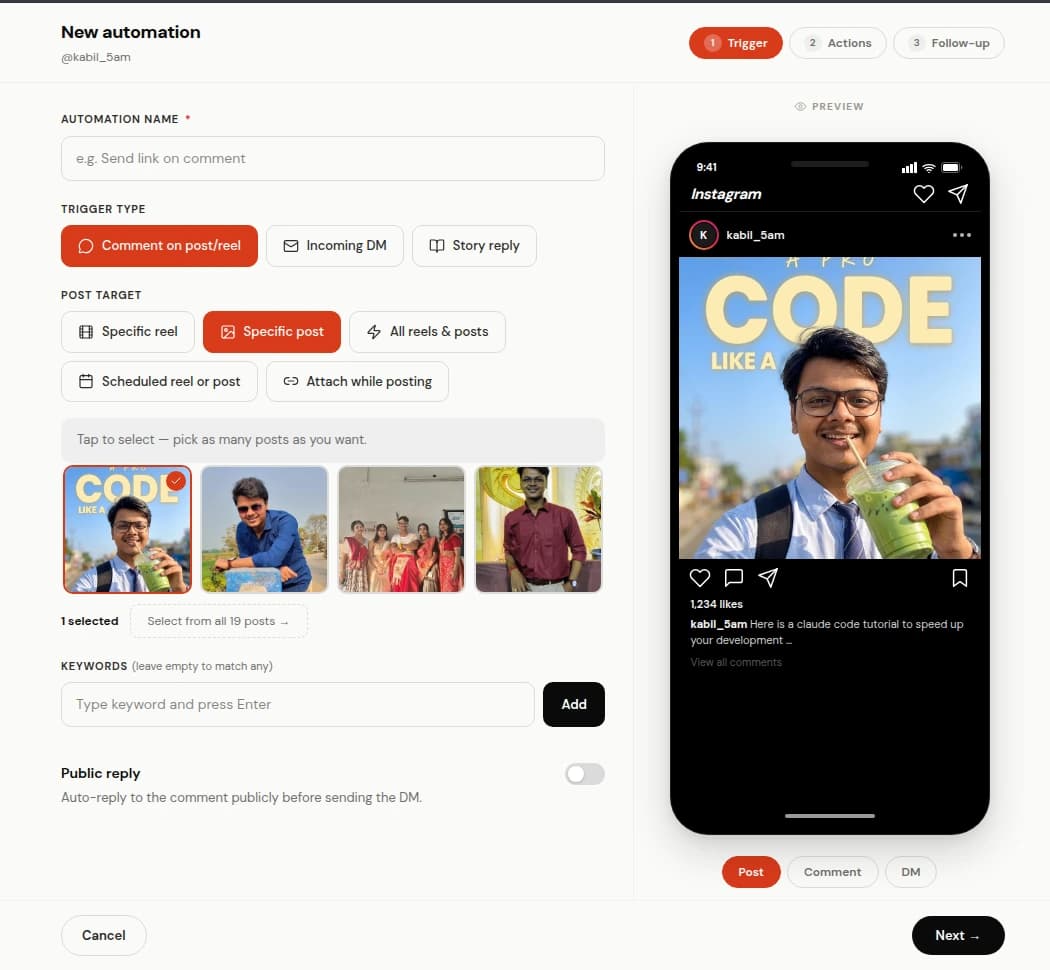
Step 1: what starts the automation, and which posts it watches. 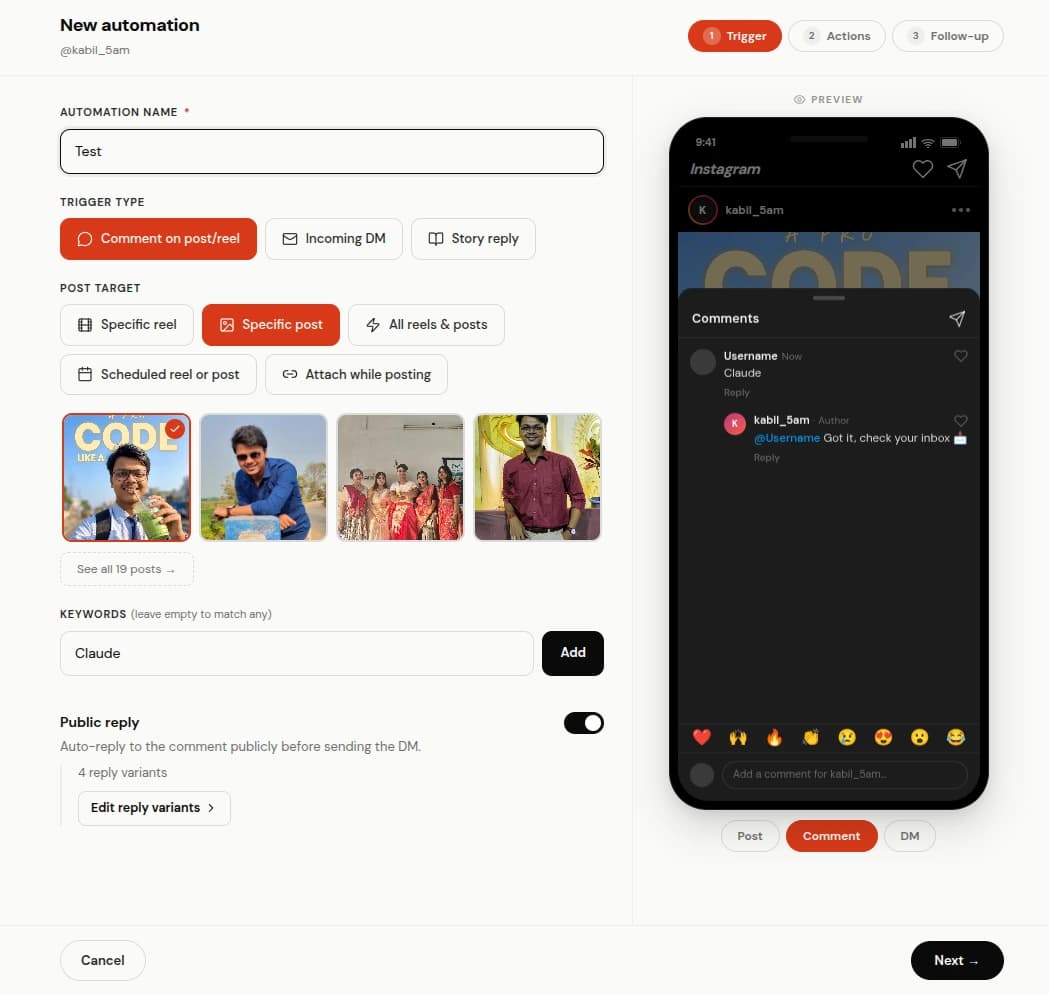
Step 2: the public reply, written as a few variants so it does not repeat. 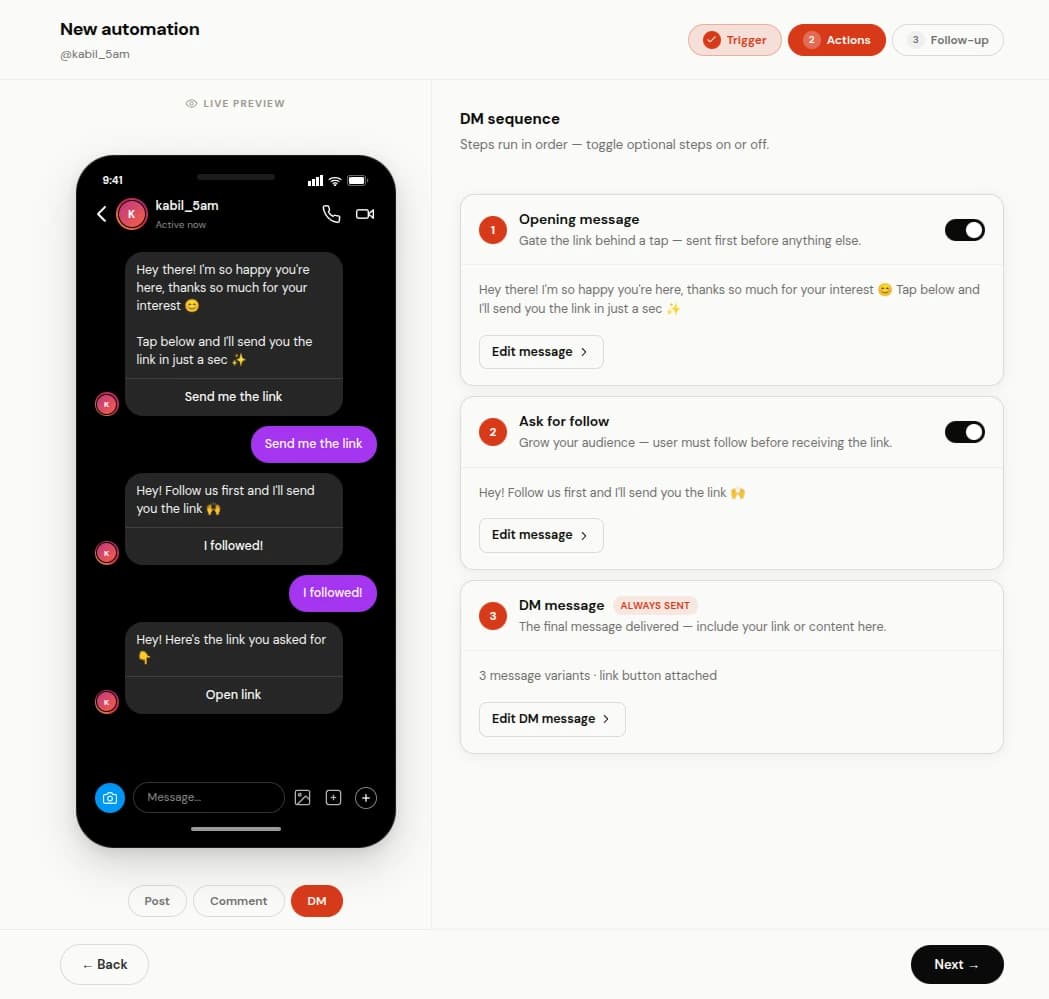
Step 3: the DM itself, with the link button and a live preview of the inbox. 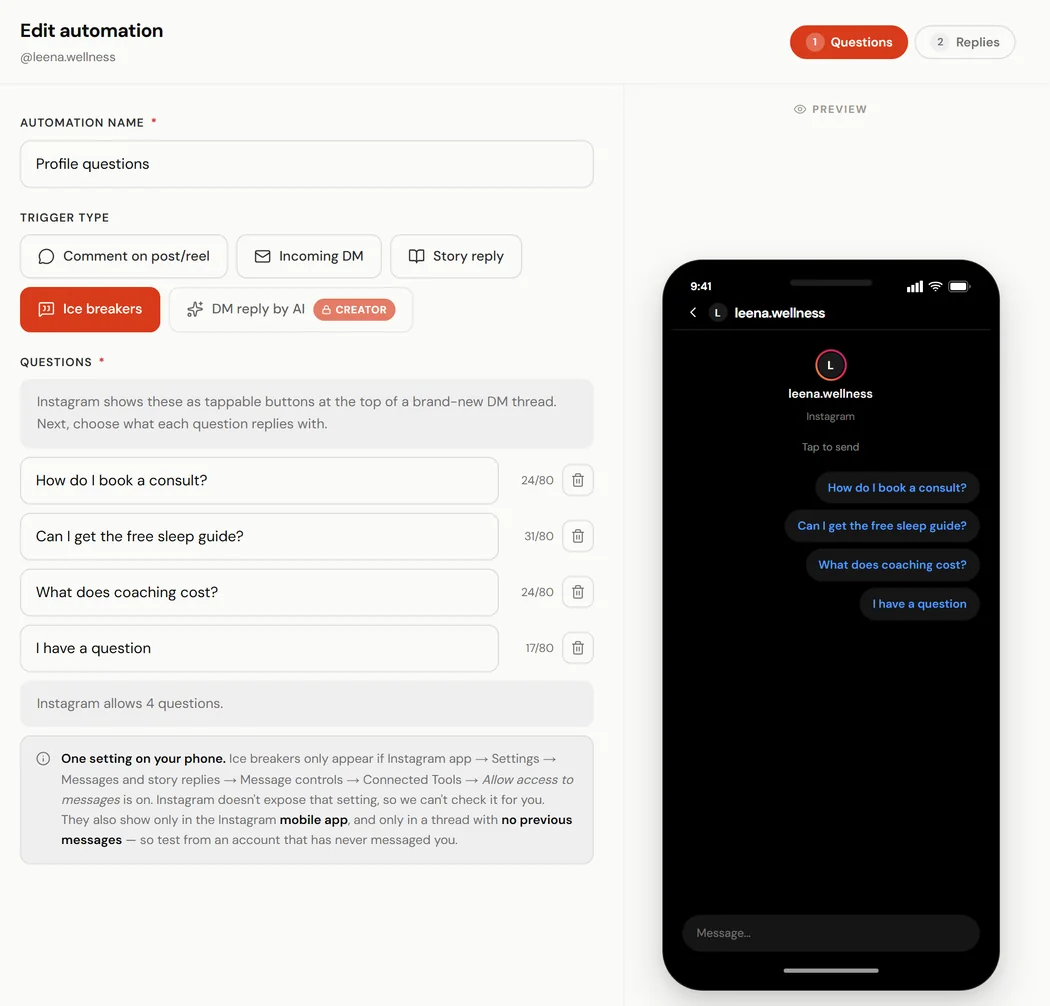
Ice Breakers: up to 4 questions, previewed the way someone who has never messaged you sees them. 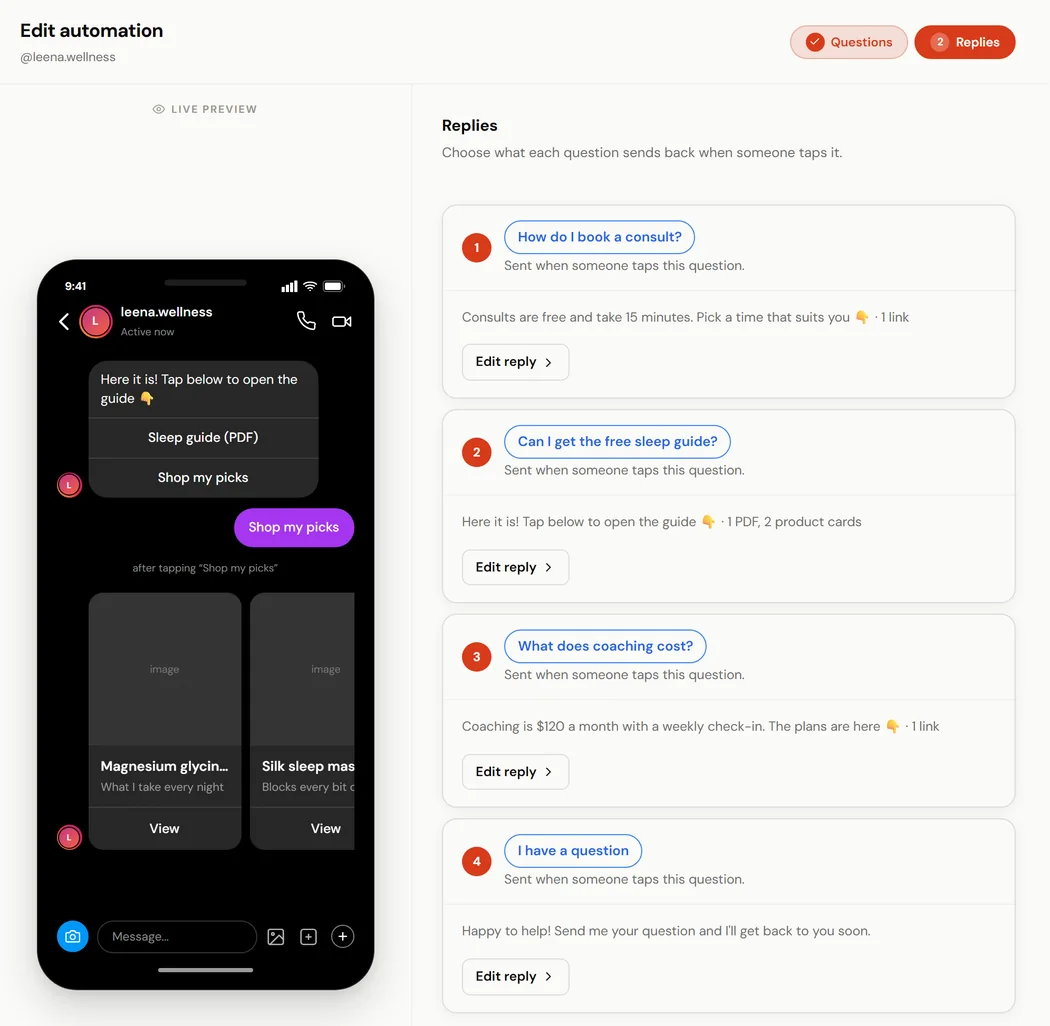
Each question gets its own reply: here a PDF and a carousel of product cards.
1 of 5
Reel, comment, DM, link, follow-up
Almost everything people mean by Instagram DM automation is one loop. Here it is with nothing left implicit.
- You post a Reel that ends on a line like: comment GUIDE and I will send it over.
- Someone comments GUIDE. Instagram fires a webhook and ReelDrop matches the keyword against it.
- ReelDrop posts a short public reply on that comment, so the next few hundred viewers can see the keyword does something.
- It opens a DM with the commenter. If the follow gate is on, the link waits behind a follow check.
- The DM delivers what you promised as tappable buttons: a link to your page or checkout, a PDF you uploaded that opens right in Instagram, or a product carousel of up to 10 cards.
- A follow-up you wrote earlier lands 30 minutes to 23 hours later, and cancels itself if they already replied.
The automation is attached to the post while you schedule it
Most people run this loop on two subscriptions. A scheduler publishes the Reel on Tuesday morning, then you open ManyChat or something like it, hunt for the post that just went live, and wire the keyword to it by hand. Two bills, two logins, and a gap where the Reel is public but the automation is not running yet.
In ReelDrop the automation picker sits in the composer. You choose the automation while you are choosing the time slot, and it goes live attached to that post the moment the post publishes. ManyChat cannot do this half at all, because ManyChat has no post publishing. A handful of schedulers have added comment-to-DM in the last year, so ReelDrop is one of the few tools that does both rather than the only one. It is still one bill instead of two.
You can also build the automation first and leave it waiting. It sits dormant until a post claims it, which is the sane order when you are batching a launch week on a Sunday night.
Set the trigger
Five things can start an automation: a comment on a post or Reel, an incoming DM, a story reply, a tap on one of your Ice Breaker questions, or, on Creator, any DM at all for the AI to answer. Pick one, then decide how wide it casts.
Keywords are matched three ways. Contains catches guide please!! and send me the guide. Exact fires only when the comment is the word by itself. Any skips keywords entirely and responds to every comment, which is the right setting for a giveaway and the wrong setting for a post that attracts arguments. You can point the automation at one specific post from a grid of your recent media, at a post you have not published yet, or at everything you post. A per-post reply limit caps how many public replies go out if a Reel gets away from you.
Write the public reply and the DM
The public reply is the part other viewers see. Write a few variants, or start from ReelDrop presets, and each commenter gets a different one, so the comment section does not turn into a wall of identical replies. There is a pre-generated bank if you would rather not write ten of them yourself.
The DM is the part that matters. By default it opens with a short message and a button, and the link card arrives once they tap. That tap is doing real work: the person confirms they want the thing before a link from a stranger lands in their inbox. Turn the opening step off if you would rather send the link straight away.
You can attach up to 3 buttons, and each one is a link, a PDF or a product carousel. A live phone preview shows the whole conversation the way the commenter will read it, which is how you catch an awkward line before a thousand people get it.
What a DM can carry
Link buttons are the default. Put up to 3 under one message, each with a label of 20 characters or fewer. Every URL has to start with https:// and point at a real domain, and the builder checks it before the automation saves. That matters because Instagram refuses the whole message over one malformed link, and the person simply never gets it.
The PDF button hands over a file instead of a page. Upload the PDF once (up to 25 MB), give the button a label like Recipe PDF, and the person taps it and reads the file in Instagram's in-app browser. A lead magnet no longer needs a landing page to live on: the guide you promised in the Reel is the thing that arrives.
The product carousel is a button that opens a strip of cards. Each card has an image, a title, an optional subtitle and its own link, up to 10 cards per button. The strip is sent only when the person taps the button, and only once. It suits a shop with several products in one Reel, or a course creator with a catalogue to point at. You write every card title and label yourself; nothing is scraped from the link.
All of this can sit behind the opening message, which is on by default. The first DM is a short line and one button, and the buttons above arrive after the tap, so a person who asked for the thing confirms they still want it before a link or a file from a stranger lands in their inbox. On Influencer and Creator you can switch the opening message off and send the buttons straight away.


The follow gate, and what verification actually means
A viral Reel hands your lead magnet to a lot of people who will never come back. The follow gate is the fix: before the link goes out, ReelDrop asks the commenter to follow you, then delivers it.
The word verification is doing something specific here. ReelDrop asks the Instagram Graph API whether that account actually follows your business account, so the gate is a check rather than an honor system. When the API cannot answer for a given account, ReelDrop falls back to trust mode and sends the link anyway instead of stranding someone who did follow you. Plenty of tools call this a follow gate and never check anything.
Follow-ups that cancel themselves
Set one follow-up on a delay you pick, anywhere from 30 minutes to 23 hours. It goes to people who got the link and then went quiet. If they reply in the meantime the follow-up is cancelled before it sends, which is the rule that keeps this a nudge instead of the tool talking over a conversation you are already having.
The longest delay is 23 hours rather than a full day because Instagram only lets a business message someone within 24 hours of that person's last message, and the hour of slack keeps the follow-up inside that window. Timed follow-ups are on Influencer and Creator.
Delays, cancellation and what a follow-up does not do, step by step:
Timed follow-ups docA menu that stays in every DM thread
Comments and story replies start conversations. The DM menu is for the people who open your DMs on their own. It is Instagram's persistent menu: up to five buttons, such as Book a call, Get my free guide or Latest offer, that stay one tap away in every conversation with your account.
Each button either opens a link in Instagram's browser or runs one of your automations. Point Get my free guide at the automation that already sends the guide to commenters, and someone who taps it in the inbox gets the same DM, with the follow gate and the follow-up if you set them, without commenting anything. The DM menu is on Influencer and Creator.
How the menu works, and what Instagram shows:
Instagram DM menuIce Breakers: the questions people see before they type
Open a brand-new DM thread with a business account in the Instagram app and you may see a few tappable questions above the message box, before anyone has typed a word. Those are Ice Breakers. You can show up to 4, such as How can I work with you? or Can I get your free guide?, and each one is the easiest message anyone will ever send you: one tap, no typing.
In ReelDrop every question gets its own reply. The guide question sends the guide, the pricing question sends the rate card, and any reply can carry up to three buttons: a link, a PDF you upload, or a carousel of link cards. The builder draws the new thread on a phone as you write, so you see the questions the way a first-time visitor will.
ReelDrop sends the questions to Instagram when you save the automation with it switched on, and takes them off again if you pause or delete it. Instagram keeps one set per account, so one Ice Breakers automation runs at a time. They show in the Instagram mobile app only, and only in a conversation with no messages yet; once someone has written to you, the DM menu is what stays in the thread. Ice Breakers are on Influencer and Creator.
The builder, step by step, with what Instagram shows and when:
Docs: Ice BreakersAn AI that answers DM questions, on Creator
Every trigger above sends a message you wrote. DM reply by AI is the exception: you write a brief once (the goal, the facts it may use, when to stop, and one link) and it answers the questions people send you in DMs from that brief. It stays quiet on a plain hi or a compliment, stops after a set number of replies to one person, and hands over with a message you wrote. It is on the Creator plan only.
What it answers, what it will not, and its limits:
DM reply by AIWhat each automation reports
Every automation carries its own counts: events received, public replies posted, DMs sent, button taps and tap rate where Instagram lets us observe it, replies and reply rate. That is enough to tell a dead keyword from a dead Reel.
When an offer runs its course, pause the automation instead of deleting it. The setup and the numbers are still there the next time you run it. Cloning an automation gives you a copy that arrives paused, so a half-edited duplicate cannot start answering people. And if you switched an automation on late, retrigger replays comments that already happened, up to 50 per post across five posts.
The lead magnet Reel
A nutrition coach posts a Reel that ends with comment MEALS and I will send you the plan. The automation replies in public, checks the follow, and delivers the link by DM. She wakes up to new subscribers instead of a comment section full of requests she has to answer by hand.
Launch day without the inbox shift
A course creator opens enrollment and pins a post with the keyword JOIN. Every commenter gets the checkout link within seconds, including the ones commenting at 2am, which is somehow always a lot of them.
A pottery teacher's launch, day by day
A ceramics teacher opens her wheel-throwing course on Monday with a Reel: comment WHEEL for the syllabus. By Monday night there are 60 comments, each with a public reply and the syllabus delivered by DM. Tuesday she notices half the commenters are not followers and switches on the follow gate. Wednesday she adds a follow-up on a 23-hour delay for people who got the link and went quiet. By Friday the automation has handled a few hundred conversations, and the only DMs she typed herself were actual questions about the course.
Every trigger by plan
Starter is a real free plan rather than a trial, but it is deliberately one trigger type: a comment on a post or Reel, on up to five active automations. Everything else in the builder unlocks at Influencer.
| Trigger or capability | Starter (free) | Influencer ($9.99/mo) | Creator ($29/mo) |
|---|---|---|---|
| Active DM automations | 5 | Unlimited | Unlimited |
| Comment-to-DM on a Reel or post | Yes | Yes | Yes |
| Story-reply trigger | No | Yes | Yes |
| Live comment trigger | No | Yes | Yes |
| DM keyword trigger | No | Yes | Yes |
| Ice Breakers: up to 4 questions on new DM threads | No | Yes | Yes |
| Follow gate with API-verified follow check | No | Yes | Yes |
| Timed follow-ups (30 minutes to 23 hours) | No | Yes | Yes |
| DM menu: up to 5 buttons pinned in every DM thread | No | Yes | Yes |
| Quick replies, including email and phone capture | No | Yes | Yes |
| Retrigger over comments that already happened | No | Yes | Yes |
| Auto-DM on posts and carousels, not only Reels | No | Yes | Yes |
| One automation across all your Reels and posts | No, target specific Reels | Yes | Yes |
| DM reply by AI: answers DM questions from a brief you write | No | No | Yes |
| Typing indicator: "seen", then "typing…", before each automated reply | No | No | Yes |
| Instagram accounts | 1 | 1 | 5, one per workspace |
What DM automation costs
ReelDrop's free plan includes 5 active DM automations — comment triggers on reels — plus a full Instagram Reels scheduler, and it never asks for a credit card. Those comment-to-DM automations have no monthly limit on how many DMs they send (Instagram's own messaging limits apply), and Instagram scheduling and posting are unlimited. Five automations covers most creators: one evergreen lead magnet, one per active launch, and a spare.
The comparison worth making is what the same workflow costs as two products. A scheduler runs $15 to $25 a month, and a dedicated DM tool starts around $15 and climbs with your contact count. ManyChat cut its free plan to 25 active contacts in March 2026, which is why so many creators went looking for something else this year.
| Plan | Price | DM automations | Also includes |
|---|---|---|---|
| Starter | $0 | 5 active, comment trigger | 1 Instagram account, unlimited scheduling and posting, Reels and carousels, analytics, 3 caption generations a month (each returns three captions). No credit card. |
| Influencer | $9.99/mo | Unlimited | Every trigger type (story reply, DM keyword, Ice Breakers, follow gate), a DM menu pinned in every DM thread, auto-DM on reels, posts and carousels, retrigger over past comments, timed follow-ups, quick replies with email and phone capture, first-comment scheduling, unlimited trial reels. $79/year. |
| Creator | $29/mo | Unlimited, plus DM reply by AI and a typing indicator | Everything in Influencer plus up to 5 Instagram accounts, unlimited AI captions and hashtags, 100 AI carousel images a month, AI Reel thumbnails, priority support. Founding pricing: $149/year or $249 lifetime. |
Five DM automations and the full Reels scheduler, on the free plan. No credit card.
Start freeRead the docs
- Create your first DM automationThe builder, step by step, with the real field names.
- Timed follow-ups
- Live comment triggers
- Ice BreakersUp to four questions on new DM threads, each with its own reply.
- DM send limits and account safetyWhich limits are ours, which are Instagram's.
- DM automation limits by plan
Frequently asked questions
Is Instagram DM automation allowed?
Yes, when it runs through the official Instagram API, which is the route Meta built for exactly this. ReelDrop is a Meta Tech Provider: Meta reviewed the business and audited how the app uses every API permission before granting access. We never see your password and cannot simulate taps on your logged-in account the way unofficial bots do.
What is comment-to-DM on Instagram?
The flow where someone comments a keyword on your post and gets the link by DM instead of hunting for it in your bio. It works because a DM survives the scroll: the commenter gets the thing they asked for in their inbox, and the public reply shows everyone else the keyword works. ReelDrop sets the whole flow up on the same screen where you schedule the Reel.
How do I auto-DM someone after they comment on my post?
Create an automation, pick the post (or attach it to a Reel you are scheduling), set the trigger keyword, and write the DM. From then on ReelDrop watches comments through Instagram's webhook and sends the DM within seconds of a match. No password, no browser extension: it runs on the official API.
Can I use ReelDrop as an Instagram auto reply tool?
Yes, for comments: it replies publicly with rotating variants and sends the DM automatically. It does not auto-answer your general inbox the way a support chatbot does, and that is deliberate. ReelDrop starts the conversation; the replies that come back land in your Instagram inbox for you to answer, unless you turn on DM reply by AI on the Creator plan, which answers questions inside the limits you set.
Will DM automation get my account banned?
Not through ReelDrop. The ban stories come from password-based tools that log in as you and fake human behavior. Instagram cannot tell that apart from a hijacked account, so it bans both. ReelDrop connects through Meta's own login screen with scoped permissions, and the API enforces Instagram's rate limits and its 24-hour messaging window server-side, so the tool physically cannot send what the policy forbids. You can revoke access anytime in your Instagram settings.
What is follow verification?
An optional gate before the link is sent, included on the Influencer and Creator plans. ReelDrop asks the Instagram API whether the commenter actually follows your account, and if they do not, it asks them to follow first and then delivers the link. When the API cannot answer for a particular account, ReelDrop sends the link rather than punishing someone who did follow you.
Can it reply publicly to the comment as well?
Yes, and you should. The public reply is what tells the next few hundred viewers that the keyword works. Write a few variants and ReelDrop rotates them so the thread does not read like a wall of copies.
Which plan includes DM automation?
All three. ReelDrop's free plan includes 5 active DM automations — comment triggers on reels — plus a full Instagram Reels scheduler, and it never asks for a credit card. Those comment-to-DM automations have no monthly limit on how many DMs they send (Instagram's own messaging limits apply), and Instagram scheduling and posting are unlimited. Influencer at $9.99/month lifts the cap to unlimited automations and adds every trigger type: story reply, DM keyword, Ice Breakers and the follow gate, plus the DM menu, retrigger over past comments and auto-DM on posts and carousels. Creator at $29/month adds DM reply by AI on top of that, plus a typing indicator that marks the message seen and shows "typing…" before each automated reply, along with 5 accounts and the AI content features.
How is this different from ManyChat?
ManyChat is a bigger, broader chat platform: more channels, deeper flow branching, an ecosystem of integrations. It has no post publishing, so you still need a scheduler next to it. ReelDrop is Instagram only, and the DM automation is attached to the post you schedule rather than wired up afterwards. If you need WhatsApp and SMS flows, ManyChat is the better tool. If your whole workflow is Instagram Reels, one tool beats two.
How many DMs can the automation send?
ReelDrop does not cap how many DMs an automation sends, on any plan, including the free one. Instagram's own messaging limits apply: Meta enforces its rate limits and messaging windows on the API side, which is part of why ReelDrop rotates message variants instead of sending identical text a thousand times in a row.
Do I need a business account?
Yes. Automations need an Instagram Business or Creator account connected to ReelDrop, because those are the account types the official API supports. Converting a personal account is free and takes a few minutes in the Instagram app.
What does the commenter actually see?
A short opening DM with a tappable button, then the link card after they tap. That tap matters: the person confirms they want the message instead of getting a cold link from a stranger. If you would rather send the link straight away, turn the opening step off.
Can the DM send a PDF or product cards instead of a link?
Yes, on every plan, including the free one. A DM carries up to 3 buttons, and each is a link, a PDF you upload (up to 25 MB) or a product carousel of up to 10 cards, each card with an image, a title and its own link. The carousel is sent when the person taps its button.
Can I set this up on a post I have already published?
Yes. Point the automation at any recent post from the media picker. If comments have already come in, retrigger replays them, up to 250 comments per post across 5 posts, skipping comments older than 7 days.
What happens when someone replies to the automated DM?
It lands in your Instagram inbox like any other message, and any pending follow-up for that person is cancelled. ReelDrop starts the conversation; it does not try to have it for you, unless you turn on DM reply by AI on the Creator plan, which answers questions inside the limits you set.
Can I add a menu to my Instagram DMs?
Yes, on Influencer ($9.99/month) and Creator. The DM menu is Instagram's persistent menu: up to five buttons pinned in every DM thread with your account. Each one opens a link or runs one of your comment, DM-keyword or story-reply automations. People see a change in new conversations straight away, and in chats they already have open once they refresh their inbox.
What are Instagram Ice Breakers?
Up to 4 tappable questions Instagram shows at the top of a brand-new DM thread with your account, before the person has typed anything. In ReelDrop each question has its own reply, with link, PDF or card buttons if you want them. Ice Breakers are on Influencer ($9.99/month) and Creator, and they show in the Instagram mobile app only.
Keep exploring
- Comment to DM automationThe keyword-on-a-Reel flow, on its own page.
- Story reply automationAnswer a typed story reply with a DM.
- Follow gate and follow-to-DMAsk for the follow, verify it, then send the link.
- Keyword triggers and auto-replyContains, exact, or any: how matching actually behaves.
- Instagram DM menuButtons pinned in every DM thread, wired to your automations.
- DM reply by AIAn AI that answers DM questions from your brief, on Creator.
- Instagram DM inboxWhere the replies to your automations land, with AI drafts.
- Instagram schedulerThe other half of the workflow, in the same composer.
- Is ReelDrop safe?Official Instagram API, no password, what we can and cannot access.
- 9 best Instagram DM automation tools in 2026Our ranked round-up, ReelDrop included and placed honestly.
- How to add a link to an Instagram ReelMeta One's Add link or a link sent by DM when someone comments, with the steps for both.
- Meta One subscription explainedEvery Meta One plan and price, and which ones include links in Reels.
- ManyChat alternatives20 tools compared, with the March 2026 free-plan change.
- Is Instagram DM automation safe?What gets accounts banned, and what does not.
- Free Instagram tools20 tools that work without an account.
Stop managing Instagram. Start growing with it.
Sign up free for AI carousels, DM automation, captions, and scheduling: built for creators who post less and grow more.
Built in Toronto by Piyush Sachdeva.